


This is feature is available if you are searching the CINAHL Plus database.
Scroll down under Search Options for four ways to limit your results to scholarly articles written by nurse(s):
1) First Author is Nurse*
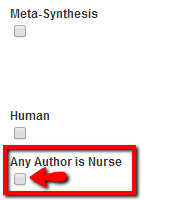
2) Any Author is Nurse*
If those do not work, try the Journal Subset**, or the Author Affiliation AF.**
1) First Author is Nurse* limiter is available in the Limit Your Results menu.

The first author is generally the person claiming most responsibility for the research in most scientific publishing. So, an article in which the first-named author is a nurse has a higher probability of reflecting nursing research interests.
*The written by a nurse limiter applies to records from November 2009 - present. Credentials include RN, BSN, MSN, or appropriate degree. For non-U.S. journals, the credentials include licensed nurse or appropriate nursing degree in the particular country.
2) The Any Author is Nurse* limiter is also located in the Limit Your Results menu. Simply tick the Any Author is Nurse box, enter your search terms in the search box, and click the Search button.
*The written by a nurse limiter applies to records from November 2009 - present. Credentials include RN, BSN, MSN, or appropriate degree. For non-U.S. journals, the credentials include licensed nurse or appropriate nursing degree in the particular country.
The Journal Subset** is located below the Any Author is Nurse limiter. Scroll through the list of journal subsets; find and select the Nursing subset. Enter your search terms and click the Search button.
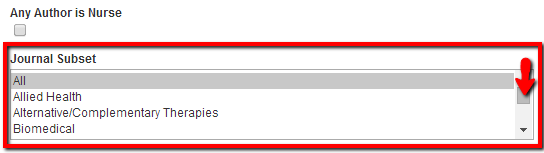
Journal Subset restricts your search to the nursing databases, filtering out other allied health discipline journals. We're assuming that nursing authors will likely publish more in nursing journals than other health science disciplines. This strategy will give you broader results than limiting by nurse author(s).
**While the logic is sound, the assumption is not foolproof. Verify the author's nursing credentials by checking the author information in the article.
AF Author Affiliation** is available in the dropdown menu next to the search box.
To search by AF Author Affiliation, click the Select a Field (optional) dropdown menu next to the first search box. Find and select AF Author Affiliation. Type nurs* into the adjacent search box, enter your specific keywords in the search box below, then click the Search button.
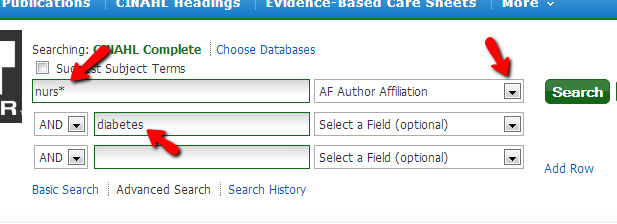
Many nurse scholars teach at or are associated with departments of nursing in institutions of higher learning, and the word "nursing" is frequently included in the department heading. In most cases, the affiliated author will be a nurse.
**The assumption is not foolproof. Verify the author's nursing credentials by checking the author information in the article. View the links below for more information.